
Tune Panel
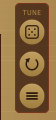
A matching framed Tune panel sits in the open space just to the right of the harp, level with the tuning pegs. It mirrors the Notes panel but acts on each string's fine-tuning (cents):
- Randomise (top) -- applies a small random detune of up to ±5 cents to each string. This creates the natural beating and shimmer of a real harp without shifting any string far from its intended pitch. Note selections are not affected. In paired mode only the main string of each course is randomised; its partner follows the same tuning, so the courses stay in tune with themselves. When you press it, each affected tuning peg briefly flashes its outline red — in its new turned position — so you can see what changed.
- Reset (middle) -- clears all fine-tuning back to 0 cents. Note selections are not affected.
- Set all to… (bottom, three-bar glyph) -- opens a small pop-up dialog that dims the rest of the plugin. It is titled "Tuning for All Major Strings" and holds a single tuning peg with a value readout beneath it (starting at 0); drag the peg up or down to choose a fine-tuning of −50 to +50 cents, exactly as you would a string's own peg. The readout colours by direction — red when sharp, green when in tune, blue when flat. As you drag, the detune is applied to the strings live so you can hear it before you commit. Click the green ✓ to keep that detune across every string at once (in paired mode only the main string of each course is set; its partner stays coupled), or the red ✗ (or press Escape, or click outside the dialog) to close and restore the tuning you had before opening the dialog. When you apply, each peg's outline flashes to show the change, just like Randomise/Reset.