
Notes Panel
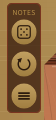
A small framed Notes panel sits in the open space just to the left of the harp, level with the tuning pegs at the top of the soundbox. It has three brass disc buttons that act on each string's note (not its fine-tuning):
- Randomise (top) -- re-notes each string to a new pitch chosen at random within one octave (±12 semitones) of its default note, so each string stays in its own register. In paired mode only the main string of each course is re-noted; its partner follows automatically. When you press it, each affected tuning peg's note label briefly flashes red to show you which strings changed.
- Reset (middle) -- restores every string to the note specified by the currently selected preset. If no preset is selected (you have a modified or unsaved sound), it restores each string to its built-in default note instead.
- Set all to… (bottom, three-bar glyph) -- opens the same modal note picker the tuning pegs use — a small pop-up dialog that dims the rest of the plugin — titled "All Major String Notes". Drag the two drums (note name and octave), or scroll them, to choose a note, exactly as you would for a single string. As you change it, the note is applied to every string live so you can hear it before you commit, so the whole harp sounds one pitch across its octaves. Click the green ✓ to keep that note across all strings at once (in paired mode only the main string of each course is set; its partner stays octave- coupled to it), or the red ✗ (or press Escape, or click outside the dialog) to close and restore the notes you had before opening the dialog. When you apply, each affected peg's note label flashes red to show what changed.