MIDI Control
The instrument accepts MIDI so you can perform it live from a keyboard or controller. The wind still plays the strings — MIDI tunes and stirs the wind — and a dedicated Pluck mode now also lets you strike strings directly when you want to. Everything below is set up in the MIDI tab of the ⚙ Settings dialog.
The wind, from your controller (MIDI-learn). Any continuous knob-style control can be driven by a MIDI CC. Out of the box:
| Controller | Drives |
|---|---|
| CC1 — mod wheel | Wind Strength |
| CC2 — breath controller | Wind Strength (blow into the harp) |
| CC11 — expression | Volume |
| Channel aftertouch — press | Wind Turbulence (lean in and the air roughens) |
To map your own controller, open Settings → MIDI, press Learn next to the parameter you want, then move the physical control — the next CC you touch is captured and shown in the list. Clear removes a mapping; Reset MIDI map restores the defaults above. The learnable parameters are the wind, tone, body and mix controls (Wind Strength, Wind Turbulence, Gust Depth, Brightness, Damping, Sympathetic, Body Resonance, Stereo Width, String Mix, Volume, Pulse Depth, String Length). A learned CC writes the parameter the same way a mouse drag does, so your DAW sees and can record the change; if both a CC and an automation lane move the same parameter, the last move wins.
Pitch bend leans the whole harp. The pitch-bend wheel shifts every string's tuning together — a very wind-like collective lean rather than a single bent note. The range is configurable in the MIDI tab (default ±50 cents; up to a full octave). The lean is momentary and is not written into your patch, so it never clutters automation and returns cleanly to centre.
Program Change switches presets. A Program Change message selects a preset and rides the same gapless crossfade as the on-screen preset arrows — no silent gap, the old sound's tail rings under the new one. Use Bank Select (CC0/CC32) to choose the bank: bank 0 = Factory presets, any other bank = your User presets. The Program number is the preset's position in that bank (0-based, in list order). This makes hands-free scene changes from a foot controller a one-message affair. Note that some hosts (e.g. certain Logic/Cubase configurations) capture Program Change for their own program menu instead of forwarding it to the plugin; if preset switching does not respond, check your DAW's program-change / MIDI routing.
MIDI Thru. With MIDI Thru enabled (the default), incoming MIDI is passed to the plugin's MIDI output, so the instrument can sit first in a live MIDI chain. Turn it off to stop passing events downstream.
Your MIDI mappings, bend range and thru setting are saved with the DAW session, so reopening a project restores the same controller wiring. They are deliberately not stored inside individual presets, so a Program Change never re-wires your controllers.
Playing notes — performance modes
Notes select what the wind is allowed to sound, not when it sounds — you play the tuning and the wind performs it.
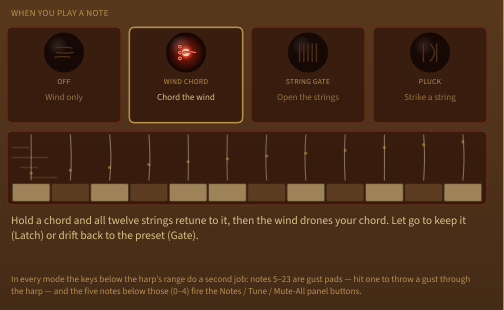
Pick a mode from the four cards under When you play a note in the Settings → MIDI tab. Each card shows a small lit glass lens engraved with what that mode does; the selected one glows with a brass frame, the rest sit dark. Under the cards, a moving diagram plays the selected mode out for you — wind flowing over the twelve strings above a keyboard, with the keys pressing themselves so you can see what your own hands would do before you play a note — and beneath that, a sentence describing it in plain terms. Hovering a card gives you the same description without switching to it, so you can read all four before committing.
- Off (default) — Wind only. Your keys stay silent; only CC, pitch bend and Program Change act, exactly as above. Choose this if you don't want your keyboard to touch the harp.
- Wind Chord — Chord the wind. Hold a chord and the 12 strings retune to voice it; the wind then drones that chord. Three Voicing styles: As played — your voicing, doubled (the default) keeps the octaves you actually played and doubles each note outward from there — an octave up, an octave down, two up, two down — so a single held note still fills the harp's range while staying centred where you played it, and a wide voicing stays wide; Direct — your chord, across the strings repeats the held chord across them at the played pitches only, so one held note puts every string on that one note; Spread — fanned up the octaves takes just the chord's note names and fans them up from the bottom of the range, so even a two- or three-note chord fills the range with a lush drone — but the octaves you played are discarded. At the top of the range the harp runs out of room to voice into, and with paired courses switched on the highest octave belongs to the partner strings. As played and Direct place a note that high on the partner rather than the main, so you still hear the pitch you played and the course still rings a clean octave; Spread wraps its fan back round to the bottom and doubles evenly across the octaves it has, instead of stacking voices on the topmost note. The two unison courses of the 12-string guitar layout are the exception — a unison has nothing to reach up to, so those two keep the whole range and sound a high note where you played it. When you let go is Latch — the chord stays (the strings keep the captured chord after you let go — sculpt a drone hands-free) or Gate — back to the preset (the strings fall back to the preset tuning when you release). The sustain pedal holds a chord as if still held. When paired courses are on, only the main strings are chorded and their partners stay octave-/unison-coupled, so the pairing is never broken. Keep this chord writes the chord you're holding into the string tuning so you can save it in a preset.
- String Gate — Open the strings. Every string starts silent; a note at a string's current tuned pitch opens that string, and releasing the note lets it close again — your hands decide which strings the constant wind may touch. Strings fade in and out rather than switching: Open time (30 ms by default) is how quickly a string comes up under your finger, Close time (400 ms) how long it takes to settle away when you let go, each adjustable from 20 ms to 3 s. A closing string keeps stirring its neighbours the whole way down. When you let go chooses Hush it, but let it ring along (the default — silent, but still stirred sympathetically by its neighbours: a ghost mute) or Silence the string (silent, and stops colouring the other strings). Either way the string keeps its ring while closed, so re-opening it sounds straight away instead of waiting for the wind to build it up again. Note velocity sets how loudly the string opens — lean on a key for a louder string. The sustain pedal holds strings open.
- Pluck — Strike a string. A note injects a short, velocity-scaled burst into a string, which blooms out of the drone and decays back into it; the wind keeps blowing underneath. What you strike chooses The nearest string, as it is tuned (the burst goes into whichever string is already closest in pitch, leaving the tuning alone) or Retune it to your note, then strike (the nearest string first jumps to the note you played, then is struck). A retuned string does not keep your note forever — Return after sets how long it holds before drifting back to the preset's own tuning (1 second to 16 seconds, default 4 seconds), so playing a melody no longer drags the whole drone onto it: the bed you are playing over stays put. Pick Hold — until you strike it again for the older behaviour, which is still the way to build a chord up by playing it one string at a time. Leaving Retune — switching back to the nearest string, turning MIDI notes off, or moving to String Gate — lets the overridden strings drift home one after another rather than all at once. (Switching to Wind Chord while a chord is held is the exception: the chord takes the tuning over outright, so there is nothing left to drift.) How hard you play shapes how playing strength maps to loudness — Even (straight through), Gentle (eases in, rewards a hard hit) or Eager (loud from a light touch). It also governs the gust pads below, and how loudly String Gate opens a string.
Wind shift spread. When a chord change moves several strings at once, they no longer all start moving in the same instant. Each string waits its own moment inside the span you set here — 300 ms by default, from 100 ms up to 2 seconds — before it begins to slide, so a chord change sweeps across the harp the way a gust does rather than switching it over. The wait is added to the Glide Time each string then takes, so at the defaults a chord takes up to about half a second to fully arrive. Pick Together — all twelve at once if you would rather have tight, immediate chord changes. It shapes any change that moves several strings together, so Randomise Notes drifts in the same way; a single string moving on its own — a peg you have just retuned — never waits.
Gust pads. Notes just below the playable range — F-1 (MIDI 5) up to B0 (MIDI 23) — are drum-pad-style gust triggers in every mode: a hit fires a velocity-scaled swell into the wind's slow gust layer, so you can play the weather. Holding the sustain pedal when you strike a pad holds the gust at its peak until you release the pedal.
Trigger notes. Five reserved notes at the very bottom fire the on-screen panel actions from your controller, in any mode: C-1 (MIDI 0) Randomise Notes, C#-1 (1) Reset Notes, D-1 (2) Randomise Tune, D#-1 (3) Reset Tune, E-1 (4) Mute All.
The note mode and its options are saved with the DAW session alongside your CC map. A held chord or gate — and a retune-then-pluck override — is live-performance state and is not saved, and a preset change (including a Program Change) clears it — a scene change resets the performance layer.