
Icon Controls
Eight parameters are presented as drag controls with iconographic glyphs (Gust and Breath were moved into the Wind Control panel and are now rotary knobs). The Voice tone shapers sit on the first control row beside the Material selector; the Resonance and Stereo / Output controls sit in their own panels (Resonance on the second row, Stereo / Output at the right of the first). All work the same way: drag upward to increase the value, drag downward to decrease it. The glyph animates to reflect the current value. The groups also carry two non-drag group-mates -- the Sympathetic coupling toggle (with the Resonance controls) and the Pan Layout selector knob (at the right end of the Stereo / Output panel).
Voice (Tone and Ring Time)
| Control | Range | Default | Description |
|---|---|---|---|
| Bright | 0 -- 1 | 0.5 | High-frequency content of the string tone. Low values produce dark, muted sounds; high values produce bright, crystalline tones. The sun glyph lights from the centre outward as you raise Bright -- its core ring glows first, then each ray fills out to its tip, the same way the Body control's rings fill from the middle out. Interacts with the material setting. |
| Damp | 0 -- 1 | 0.225 | The single ring-time control. Low damping lets strings ring freely (long sustain); high damping creates shorter, more percussive tones. As you raise Damp, a piano-style damper assembly -- a wooden block with a cream felt pad glued beneath it -- lowers across the top of the harp canvas. The felt's lower edge has an upside-down-V notch over each string, so as the damper descends every string settles deeper into its own felt channel, mirroring the physical action that is shortening the ring time. (The separate Decay control was removed -- it was redundant with Damp -- and Damp's default was re-centred so the out-of-the-box sustain is unchanged.) Turning Damp below its default now audibly lengthens the ring across the whole lower half of the knob -- previously the bottom of its travel, especially on the Metal material, was a flat dead zone that barely changed the sound (issue #857). |
| Length | 75 -- 120 cm | 90 cm | Physical length of the harp strings, and a register/tone shaper. Longer strings pull the voice down into a darker, bodier register (the wind weights the lower partials); shorter strings brighten it into a tighter, more present tone. They also sustain longer and have a narrower lock-in window, so the wind speed must be more precisely tuned to excite them, while shorter strings respond more easily but decay faster. At the 90 cm default the register sits neutral -- moving the knob rocks the tone about that centre. The harp canvas reflects the change directly: the wooden box (and the strings between its bridges) grows taller as you raise Length and shrinks as you lower it. |
| Gauge | 0 -- 1 | 0.5 | How thick the whole set of strings is. Drag up for a heavier gauge -- darker, longer-ringing, and slower to respond to the wind, like moving to a heavier string set on a real instrument. Drag down for a lighter gauge -- brighter and quicker to speak. The centre position is the default and is exactly how every Aeolian Wind Drone preset has always sounded, so moving Gauge is a deliberate re-voicing; it is saved with the preset like the other tone shapers. Five etched string cross-sections thicken with a widening lit core as you raise the value. |
Resonance and Stereo / Output
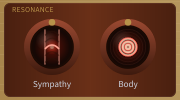
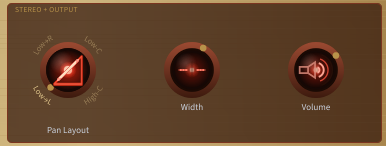
(Gust and Breath now live as rotary knobs inside the Wind Control panel -- see the Wind Control section.)
These are two framed panels. The Resonance panel groups the Sympathy and Body amounts. The Stereo / Output panel groups the Pan Layout selector with the Width spread it arranges and the master Volume as the final output stage.
| Control | Range | Default | Description |
|---|---|---|---|
| Sympathy | 0 -- 1 | 0.5 | Sympathetic resonance between strings. When a string vibrates it can set other strings in motion at shared harmonics, just as on a real harp. Higher values create a richer, more interconnected sound; at zero, sympathetic coupling is fully disabled. |
| Body | 0 -- 1 | 0.5 | Strength of the soundbox body resonance. At zero the string signal passes through without colouration; higher values add the warm resonant modes of a hollow wooden box, enriching the tone with subtle low-mid emphasis. The resonance character changes slightly with the selected material. The harp canvas itself reflects this: at zero the soundbox sits flat, and as Body increases a back panel slides further behind the front face at an isometric angle, so the visible depth of the box grows with the resonance you are dialling in. |
Pan Layout selector (Stereo / Output cluster) -- a rotary selector knob in the same style as the Material knob. A brass dot points at the current mode and the four short labels (LOW-L / LOW-R / LOW-C / HIGH-C) are stamped in capitals around the top of the knob, the current one standing out; the centre lens lights up with the current layout's icon in a warm red glow. Click a label to switch straight to that layout, or click the knob itself for a list of all four, by their full names; you can also drag up or down to step through them. It is co-located with the Width control whose spread it arranges. The four available modes set how the 12 strings are arranged across the stereo field:
| Mode | Layout |
|---|---|
| Low→L | Lowest strings at the left, highest at the right (ascending) |
| Low→R | Lowest strings at the right, highest at the left (descending) |
| Low Centre | Lowest strings at the centre, highest spread to the sides |
| High Centre | Highest strings at the centre, lowest spread to the sides |
This selector changes the mapping; the overall amount of spread is set by the Width control beside it.
Seeing the stereo field -- the mic row. Just below the divider that separates the controls from the harp, a row of small studio-microphone icons floats above the soundbox and shows, at a glance, what the Width and Pan Layout controls are doing. Each mic's pickup end points down at the soundboard, and a letter beside it (L, R or C) marks which side of the stereo image it feeds. As you raise Width the mics move further out toward the top corners of the soundbox; as you change Pan Layout they swap sides and regroup to match the table above (for the two "Centre" modes a single C mic sits on one side and the L+R pair sit together on the other). Mics placed off-centre tilt inward, aiming at the middle of the board. At Width 0 (mono) the row collapses to a single, bolder mic pointing straight down in the centre, with no letter. The row stays in its own fixed band and never overlaps the tuning pegs or the soundbox, even as String Length and Body resize the instrument.
| Control | Range | Default | Description |
|---|---|---|---|
| Width | 0 -- 1 | 0.6 | Spreads the 12 strings across the stereo field. The glyph shows two ear icons. At zero all strings are centred (mono); at maximum they span the full left-right image. The arrangement of the spread is set by the Pan Layout selector beside it, and the mic row above the soundbox (see Seeing the stereo field above) shows the result live. |
| Volume | 0 -- 1 | 0.7 | Master output level. The output is soft-saturated so it will not clip harshly at high levels. |