
Harp Canvas
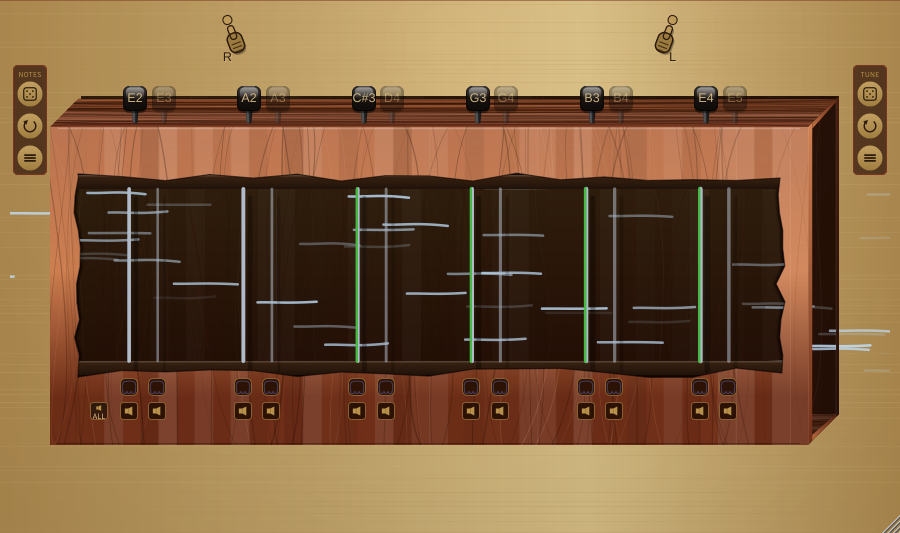
The harp canvas is the large central panel showing the instrument's wooden soundbox, bridges, and all 12 strings stretched between them. The box is drawn as a 3D wooden enclosure with a rounded opening cut through the front face -- the cutout lets you see the strings vibrating inside the body, while the surrounding wood band (carrying the mute / ghost-mute strips along the bottom) hides their ends so they read as anchored inside the box; the tuning pegs sit on the lit top panel of the box above the strings. The right end of the box is open: looking past the front edge you see straight into the body -- the dark back wall (styled like the cavity behind the strings) and a triangular slice of the box's internal floor at the bottom right, with the cut thickness of the wooden planks visible along the edges. The left end is likewise open, so the wind has a path through the instrument. The wind is shown as pale blue streaks that fly all the way across the panel, from the left-hand side to the right-hand side -- the box is inset slightly from the panel edges so the streaks first appear over the bare wood background to the left of the box, before they reach it; they then pass behind the vibrating strings as they cross the soundbox, continue through the open right end in front of the back wall (and behind the wooden plank edges, which hide them just as solid wood would), and finally stream off over the background to the right of the box, brightening to an icy white-blue and quickening as you raise the Wind, Gust, and Turbulence knobs above. This left-to-right flight, entering and leaving beyond the body, makes it clear the wind is travelling through the box. The canvas updates at 30 Hz and serves as both the primary visualization and the tuning interface. Several main controls have a direct visual analogue on the canvas so the instrument looks like it is being altered, not just heard differently:
- Damp lowers a piano-style damper assembly that emerges from behind the top wood band and seats down onto the strings inside the cutout. The assembly is a wooden block with a cream felt pad glued beneath it (a thin glue seam between them); the felt's lower edge carries an upside-down-V notch over each string. At zero the assembly is fully retracted behind the front face; as Damp rises it descends and each string sinks deeper into its felt V channel, and at maximum it is fully seated and contacting the strings.
- Body controls the visible depth of the soundbox, which is drawn as an open-ended wooden box at a shallow isometric angle. The back wall is always visible; raising Body pushes it further back, deepening the box so more of the interior back wall, the lit top, and the internal floor triangle come into view.
- Length scales the height of the soundbox so the bridges follow the strings. Raising Length grows the box (and the visible string span) vertically; lowering it shrinks the box. The tensioner pegs and the mute / ghost-mute strips re-anchor to the bridges automatically.
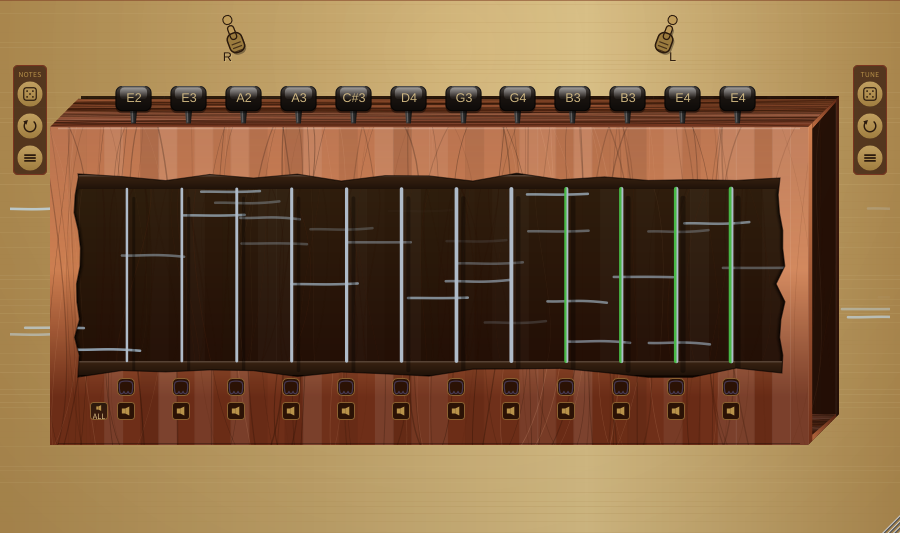
Pairing layout -- when the Pairing toggle is on, the 12 strings are visually grouped into 6 tight courses with a wider gap between each course, mirroring the way a 12-string guitar arranges its paired strings. When Pairing is off the 12 strings are laid out with uniform spacing to signal that they are independent. This is a purely visual cue -- no DSP behaviour is affected by the layout itself.
String visualization -- each string vibrates laterally, and its motion now tracks the controls that audibly shape it, not just its raw energy:
- Playing level -- the lateral amplitude responds smoothly to how hard the string is ringing. It is no longer pinned to the maximum wiggle the moment a string sounds, so quiet strings move a little, loud strings move more, and there is always visible headroom for Wind and Sympathy to push the motion further.
- Damp -- raising Damp visibly calms the strings (the wiggle shrinks); lowering it lets them ring more freely (the wiggle grows). This mirrors the audible shortening and lengthening of the ring time.
- Bright / Material -- Brightness (scaled by the selected Material) changes the shape of the vibration. A dark or Nylon string sways as a smooth single arc; a bright or Metal string breaks into a crystalline multi-node standing wave that shimmers with finer, faster ripples and reads slightly lighter. Gut sits between the two.
Each string is shaded with a gradient across its thickness: the left edge shows the fine-tuning offset and the right edge shows the selected material.
The left-edge tuning colour:
- Green -- tuned to the centre (0 cents)
- Blue shades -- tuned flat (negative cents), darker with larger offset
- Red shades -- tuned sharp (positive cents), darker with larger offset
The right-edge material shade follows the Material control:
- Gut -- warm cream (the lightest)
- Nylon -- warm neutral grey
- Metal -- cool steel (the darkest)
The Material selector knob shows this same shade -- each of its three option names is tinted in its material shade (the selected one brightest), matching the strings on the canvas, so the control and the instrument always agree.
Changing a string's note -- drag a string up or down directly on the canvas to step its pitch through the chromatic scale. Dragging up raises the note; dragging down lowers it.
Tensioner pegs -- mounted along the lit top panel of the soundbox, above the strings, each string has an interactive peg styled as a side-on skeuomorphic guitar machine-head, a glossy black ebony button on a tapered post:
- Drag the peg up / down -- fine-tunes the string by up to ±50 cents (half a semitone). While you drag, a small floating value box appears just above the peg and tracks the live note and fine-tuning (e.g. "A3 (+12 ¢)"), the same readout the rotary knobs show; it disappears when you release.
- Click the peg (or right-click) -- opens a note picker for coarse pitch changes. A modal panel (titled with the string number, e.g. "String 3 Note") dims the rest of the window and shows two selectors: drag (or scroll) the left one to choose the note name (C through B) and the right one to choose the octave (1 to 6). Click the green ✓ to apply the chosen note -- the peg's note label flashes to confirm -- or the red ✗, press Escape, or click outside the panel to cancel with no change.
The peg turns as you fine-tune, just like turning a real tuning machine viewed side-on -- the button appears to rotate around a vertical axis. At 0 cents it sits face-on and ebony black; as you tune flat it turns to the left and tints blue, and as you tune sharp it turns to the right and tints red. As it turns, the visible button face narrows and an angled side edge is revealed, and the depth of the colour deepens -- all tracking how far the string is detuned, mirroring the green/blue/red tuning colour the string itself shows below.
The default tuning follows a paired-course arrangement similar to a 12-string guitar: E2/E3, A2/A3, D3/D4, G3/G4, B3/B3, E4/E4. You can retune any string to create custom scales, microtonal tunings, or drone textures. Retuning also re-derives the sympathetic coupling (see Sympathetic Resonance below), so bringing strings into unison or octave relationships strengthens their resonant interplay — and pushing the Sympathy knob high on a strongly coherent tuning is where the resonance is most pronounced.
String mute strip -- a row of speaker-icon buttons sits below the lower bridge, one per string plus a "Mute All" button on the right. Clicking a button toggles a hard mute on that string: the string falls completely silent and contributes no energy. Clicking "Mute All" mutes or unmutes all 12 strings at once. For a worked example, load the Broken Comb preset: it hard-mutes every other string, leaving six strings in a wide open-fifth spread so you hear the gaps between them. Three Strings takes it further -- it mutes nine of the twelve (the "Mute All", then unmute-a-few workflow) to leave a near-monophonic low drone.
Ghost mute strip -- a second row of buttons sits above the mute strip. A ghost-muted string is silent in the audio output but its delay line keeps running, so it continues to participate in sympathetic resonance. This lets you shape the harmonic texture without hearing the string directly. The Silent Resonators preset is built around this: eight of its twelve strings are ghost-muted and tuned into an open chord, and with the Sympathy knob turned well up you hear those silent strings ringing through the four you can hear.