
Material and Pairing
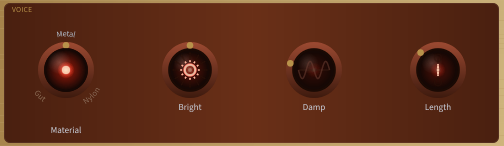
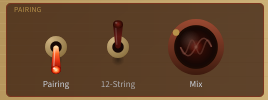
The controls are grouped by function. The Material selector closes the Voice panel on the right (its tone shapers sit beside it on the same row), and the Pairing panel (Pairing toggle, 12-string toggle, and the Mix blend those toggles gate) sits on the second control row between the Resonance and Wind panels. The Pan Layout selector lives beside the controls it belongs with (see Icon Controls below).
Material selector -- a rotary selector knob, the same size and cherry-ring style as the tone-shaper knobs beside it. A brass dot on the knob points at the current material, and the three option names (GUT / METAL / NYLON) are stamped in capitals around the top of the knob, like the lettering on its brass nameplate, each in its own colour (amber for gut, pewter for metal, ivory for nylon); the current one stands out and the others are faded. Click a name to switch straight to that material, or click the knob itself for a list of all three to choose from; you can also drag up or down to step through them. The three available materials shape the overall character:
| Material | Character |
|---|---|
| Gut | Warm, rich midrange, traditional sound. Moderate sustain and smooth wind response. |
| Metal | Bright, shimmering, long-ringing. Strong wind response with metallic overtones. |
| Nylon | Soft, dark, gentle. Short sustain and subdued excitation for intimate textures. |
Pairing toggle -- enables or disables octave-pair blending. The 12 strings are arranged in 6 paired courses; when pairing is on, each fundamental string is blended with its octave partner. When pairing is off, all 12 strings are treated as independent.
12-string toggle -- when on, pairs 4 and 5 (the lower-pitch courses) are tuned in unison, matching the traditional 12-string guitar layout (4 octave pairs + 2 unison pairs). When off (default), all 6 pairs are tuned one octave apart. This setting is captured by each preset and is DAW-automatable like the other main-panel controls. The 12-string layout only applies to paired courses, so this toggle is greyed out and has no effect when the Pairing toggle (to its left) is off.
Mix (0 -- 1, default 0.3) -- controls how much of the partner strings are blended in. At zero only the fundamental strings are heard; higher values bring in the partner strings for a fuller, chorus-like sound. This control is greyed out and has no effect when Pairing is off. Mix sits immediately beside the Pairing and 12-string toggles because it is the amount those toggles gate.